Time blocking is a powerful productivity technique that revolutionizes daily scheduling by allocating specific time periods to distinct activities, eliminating context-switching, and ensuring deep focus on important work. The How to Use Time Blocking in Your Daily Calendar – Ultimate Guide provides comprehensive strategies for implementing this transformative time management methodology. By strategically dividing days into focused time blocks, professionals and individuals achieve superior productivity, reduce decision fatigue, and accomplish meaningful progress toward important goals.
What is Time Blocking?
Time blocking divides the day into distinct time periods, each dedicated to a specific activity or category of work. Rather than maintaining fluid to-do lists, time blocking creates structured schedules ensuring adequate time for priorities while preventing meeting overload and task fragmentation. This approach leverages batch processing, deep work psychology, and calendar visualization to maximize productivity.
Why Time Blocking Improves Productivity
- Deep work protection: Uninterrupted blocks enable focused, high-quality work on important projects
- Context-switching reduction: Dedicated periods prevent mental switching costs between unrelated tasks
- Decision fatigue elimination: Pre-planned blocks remove constant decisions about “what to work on next”
- Predictable availability: Colleagues and clients know your availability patterns
- Time anxiety reduction: Allocated time creates psychological permission for relaxation outside blocks
- Goal alignment: Daily schedule directly reflects priority alignment

Core Principles of Effective Time Blocking
Principle 1: Align Blocks with Energy Levels
Schedule most cognitively demanding work during peak energy hours. Most people experience peak cognitive capacity in morning hours (8am-11am). Reserve these periods for strategic thinking, creative work, and complex problem-solving. Assign routine administrative tasks to lower-energy periods (post-lunch, late afternoon).
Principle 2: Batch Similar Tasks
Group related activities into single blocks rather than spreading throughout day. Answer all emails in designated email block, conduct all calls in dedicated communication block, and handle all administrative tasks in administrative block. Batching reduces context-switching overhead and improves efficiency.
Principle 3: Include Buffer Time
Insert 15-30 minute buffers between time blocks for transitions, breaks, and handling unexpected interruptions. Buffers prevent cascading delays and provide mental rest between focused work periods.
Principle 4: Respect the Block
Treat time blocks as non-negotiable commitments. Mark blocks in calendar, disable notifications unrelated to the block’s focus, and protect allocated time. Treating blocks seriously establishes credibility and ensures consistent implementation.
Principle 5: Account for Flexibility
While time blocking emphasizes structure, include flexible time blocks for unexpected meetings, urgent issues, and reactive work. Typically, 20-30% of daily time should remain flexible for adaptability.
Types of Time Blocks
1. Focus/Deep Work Blocks
Duration: 60-90 minutes
Characteristics:
- Uninterrupted, distraction-free periods
- Scheduled during peak energy hours
- Notifications and communications disabled
- Single-project focus
- Strategic, creative, or complex work
Best Time: Morning (8am-11am for most people)
2. Meeting Blocks
Duration: 30 minutes to 2 hours (varies)
Characteristics:
- Scheduled for collaborative sessions
- Often clustered in dedicated “meeting windows”
- Include prep and follow-up time adjacent to meetings
- Minimizes meeting overflow throughout day
- Preserves focus blocks for deep work
Best Time: Mid-morning or early afternoon (10am-12pm or 2pm-4pm)
3. Administrative/Routine Tasks Blocks
Duration: 30-60 minutes
Characteristics:
- Email processing and responses
- Administrative tasks and paperwork
- Calendar management and scheduling
- Low cognitive demand work
- Batch similar activities
Best Time: Post-lunch or late afternoon (1pm-2pm or 4pm-5pm)
4. Learning/Professional Development Blocks
Duration: 30-60 minutes
Characteristics:
- Skill development and learning
- Reading and research
- Course completion or training
- Personal development activities
- Career advancement preparation
Best Time: Morning (if energy permits) or scheduled regularly weekly
5. Strategic Planning Blocks
Duration: 30-60 minutes (weekly or monthly)
Characteristics:
- Goal setting and progress review
- Strategic decision-making
- Long-term planning
- Priority alignment
- Reflection and adjustment
Best Time: Weekly Friday afternoon or Sunday evening
6. Communication Blocks
Duration: 30-45 minutes
Characteristics:
- Phone calls and video chats
- One-on-one check-ins
- Team syncs
- Client calls
- Consolidated communication period
Best Time: Mid-day, between deep work blocks
7. Personal/Wellness Blocks
Duration: 30-60 minutes
Characteristics:
- Exercise and fitness
- Meal breaks
- Meditation and mindfulness
- Personal errands
- Mental health and self-care
Best Time: Morning (exercise), lunch hour, or end of day
Sample Daily Time Block Schedules
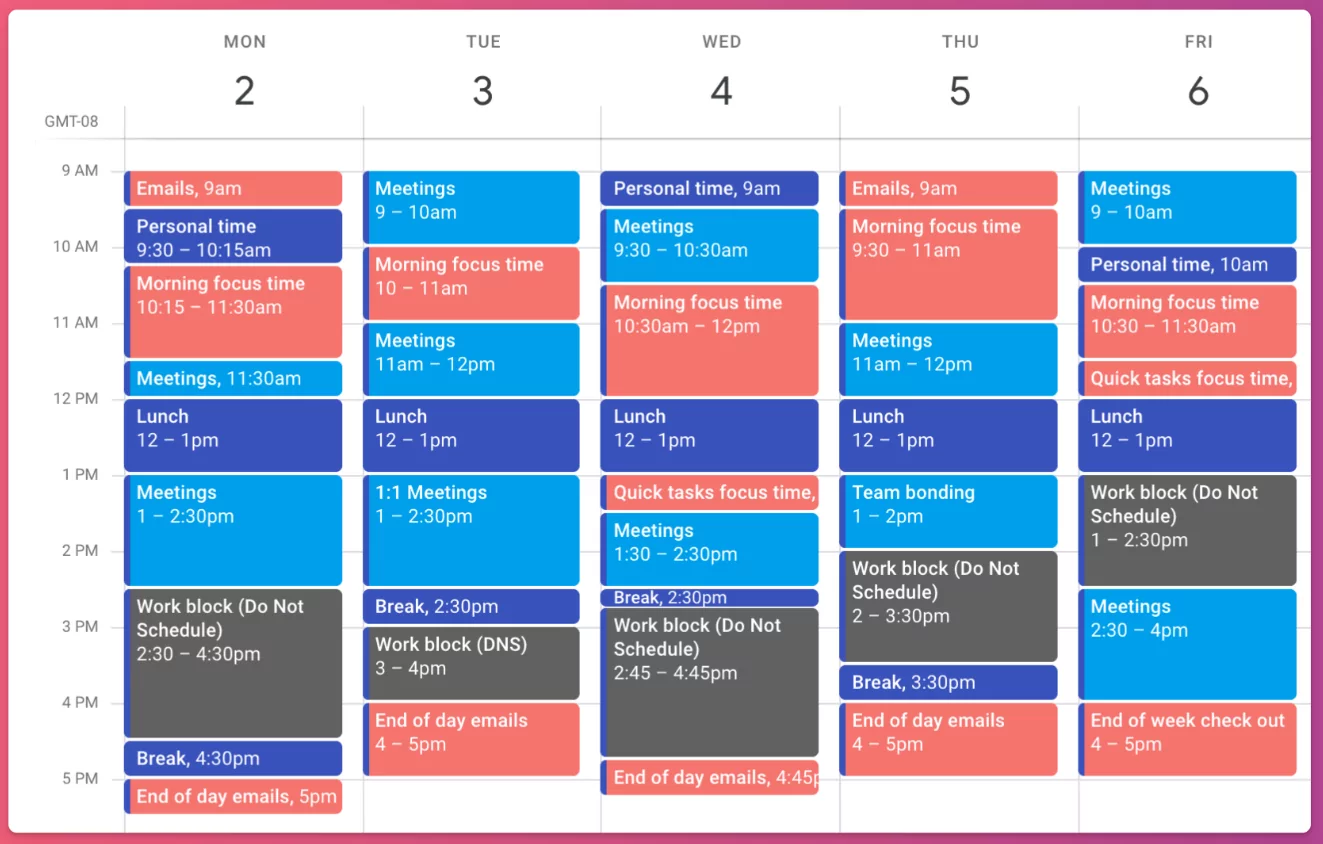
Schedule 1: Knowledge Worker (9am-5pm)
| Time | Block Type | Activity | Notes |
|---|---|---|---|
| 9:00-10:00am | Morning Routine | Email, planning, coffee | Ease into day |
| 10:00-12:00pm | Focus/Deep Work | Strategic project work | Peak energy hours; no interruptions |
| 12:00-1:00pm | Lunch/Wellness | Lunch break | Mental and physical restoration |
| 1:00-2:30pm | Meetings | Team meetings, client calls | Concentrated meeting window |
| 2:30-3:00pm | Buffer/Transition | Rest, walk, mental reset | Recovery time |
| 3:00-4:00pm | Administrative | Email, admin tasks, scheduling | Lower energy period suitable work |
| 4:00-4:30pm | Planning | Review day, plan tomorrow | End-of-day reflection |
| 4:30-5:00pm | Buffer/Wrap-up | Tidy desk, final emails, close day | Transition to personal time |
Schedule 2: Entrepreneur/Flexible Schedule
| Time | Block Type | Activity | Notes |
|---|---|---|---|
| 6:00-7:00am | Personal Wellness | Exercise, meditation, breakfast | Healthy start |
| 7:00-8:00am | Strategic Focus | Highest-priority business work | Peak energy time |
| 8:00-10:30am | Deep Work Block | Uninterrupted focus work | Extended focus period |
| 10:30-11:00am | Buffer | Coffee, stretch, reset | Recovery |
| 11:00am-12:00pm | Communication | Team calls, client contact | Concentrated communication |
| 12:00-1:00pm | Lunch/Personal | Lunch, personal tasks | Midday break |
| 1:00-2:30pm | Administrative | Email, admin, scheduling | Post-lunch lower-energy work |
| 2:30-4:00pm | Flexible/Reactive | Urgent items, flexible work | Handles unexpected needs |
| 4:00-5:00pm | Planning/Learning | Development, planning, reflection | Growth and strategy |
Schedule 3: Parent with School Hours
| Time | Block Type | Activity | Notes |
|---|---|---|---|
| 5:30-6:30am | Personal Wellness | Exercise, quiet time, coffee | Before family wakes |
| 6:30-8:30am | Family Time | Breakfast, kids prep for school | Family routine |
| 9:00-11:30am | Deep Work | Focused work, meetings | School hours core work |
| 11:30am-12:30pm | Administrative | Email, admin tasks | Lower focus period |
| 12:30-1:00pm | Lunch | Personal meal break | Recharge |
| 1:00-2:30pm | Deep Work | Project continuation | Afternoon focused work |
| 2:30pm | Family Time | School pickup, personal time | Work day ends |
| 6:00-9:00pm | Flexible Work | Evening work (if needed) | After kids bedtime |
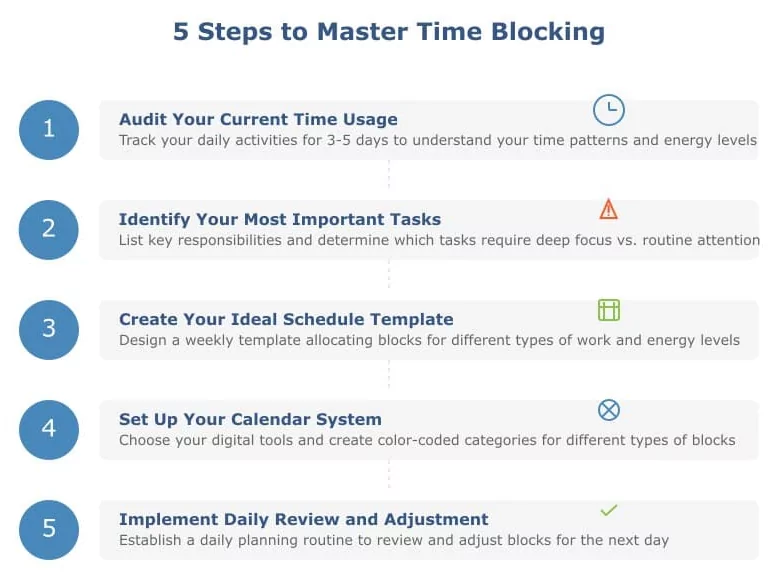
Implementing Time Blocking in Your Calendar
Step 1: Identify Your Time Blocks
- List 3-5 recurring daily activities consuming significant time
- Identify your peak energy hours
- Determine work patterns (focused work, meetings, admin)
- Note personal priorities (exercise, learning, family)
Step 2: Design Your Ideal Day
- Allocate peak energy hours to most important work
- Group related activities into blocks
- Schedule focus blocks first (most valuable time)
- Add meeting windows and administrative time
- Include personal wellness and breaks
- Maintain 20-30% flexibility for unexpected needs
Step 3: Calendar Implementation
- Open your calendar application (Google Calendar, Outlook, etc.)
- Create recurring events for daily time blocks
- Use distinct colors for different block types
- Add block-specific details and focuses
- Set automatic reminders 5-10 minutes before each block
- Protect blocks from meeting requests or interruptions
Step 4: Establish Supporting Habits
- Disable notifications unrelated to current block
- Use “Do Not Disturb” features during focus blocks
- Close unnecessary applications and browser tabs
- Communicate block schedule to colleagues and family
- Review and adjust blocks weekly
Time Blocking Best Practices
For Focus Blocks
- Use Pomodoro Technique: 25 minutes focused work, 5-minute breaks
- Eliminate all interruptions: phone silent, email closed, notifications off
- Have necessary materials ready before block starts
- Use white noise or focus music to enhance concentration
- Track completed focus blocks for motivation and analytics
For Meeting Blocks
- Cluster meetings in defined windows (e.g., 10am-12pm)
- Leave meeting blocks slightly flexible for negotiation
- Include prep time before and debrief time after important meetings
- Protect meeting-free blocks fiercely from meeting requests
- Use buffer time between meetings for notes and transition
For Administrative Blocks
- Process all emails at designated times (typically 9am, 2pm, 4pm)
- Batch similar administrative tasks
- Use templates and shortcuts to accelerate routine work
- Schedule during lower-energy periods
- Minimize interruptions in this block despite lower priority work
Common Time Blocking Mistakes to Avoid
- Over-scheduling: Including too many blocks leaves insufficient flexibility
- Ignoring energy levels: Scheduling important work during low-energy periods
- Unrealistic block duration: Blocks too short don’t allow deep focus; too long cause fatigue
- Poor communication: Not informing colleagues about block availability impacts
- Inflexibility: Treating blocks as absolute prevents adaptation to real needs
- Neglecting reviews: Not adjusting blocks based on experience and results
Measuring Time Blocking Success
Key Metrics
- Focus block completion rate: Percentage of scheduled focus blocks actually protected and completed
- Deep work hours: Total uninterrupted focused work time weekly
- Meeting-free time: Percentage of day free from meetings
- Task completion rate: Percentage of planned daily/weekly tasks completed
- Subjective productivity: Self-assessment of daily productivity and satisfaction
Weekly Review Questions
- Did I respect my time blocks this week?
- Which blocks were most valuable and productive?
- What blocks need adjustment or elimination?
- Did I maintain adequate focus time for important work?
- How can I improve block adherence next week?
Advanced Time Blocking Strategies
Time Blocking by Project
Assign specific projects dedicated time blocks daily or weekly. Example: Monday-Wednesday mornings for Project A, Thursday-Friday mornings for Project B. This enables deep progress on multiple priorities.
Time Blocking by Energy Type
Schedule blocks by cognitive demand: high-level strategic work in morning, tactical execution mid-day, administrative work late afternoon. Aligns work type with natural energy patterns.
Themed Days
Dedicate specific days to specific work types. Example: Monday for planning, Tuesday-Thursday for focused work, Friday for collaboration and reflection. This macro-level batching amplifies efficiency.
Buffer Day Implementation
Schedule one day weekly (often Friday) with minimal meetings and more flexible blocks for catch-up, planning, and unexpected items. Prevents week-long meeting overload.
Conclusion
Time blocking transforms daily calendars from reactive scheduling tools into strategic productivity systems. By allocating specific time periods to distinct activities, protecting peak energy hours for important work, and batching similar tasks, professionals dramatically enhance focus, reduce context-switching costs, and achieve meaningful progress on priorities. Successful time blocking requires identifying personal energy patterns, designing ideal daily structures, implementing blocks consistently in calendars, and adjusting based on weekly review. Whether knowledge workers managing complex projects, entrepreneurs juggling multiple priorities, or parents balancing work and family, time blocking delivers superior productivity, reduced stress, and greater alignment between daily actions and meaningful goals. Begin implementing time blocking today to transform your 2025 productivity and achieve ambitious objectives through strategic daily calendar management.


