In today’s fast-paced digital world, staying organized is more important than ever. Between work meetings, personal commitments, project deadlines, fitness goals, and family activities, managing time effectively can be challenging. Fortunately, digital calendar apps have evolved into powerful productivity tools that help users stay organized, focused, and efficient.
The best digital calendar apps for productivity in 2026 offer much more than simple scheduling. Modern calendar platforms now include artificial intelligence, task management, automated reminders, team collaboration features, and cross-device synchronization.
This step-by-step guide explores the top calendar apps available in 2026 and explains how to use them to maximize productivity.
Why Digital Calendar Apps Matter in 2026
Time management has become a critical skill in both personal and professional life.
Digital calendars help users:
- Organize schedules
- Track appointments
- Set reminders
- Manage projects
- Coordinate teams
- Improve work-life balance
Unlike paper planners, digital calendars provide real-time updates and synchronization across multiple devices.
This makes them essential tools for modern productivity.
Key Features to Look for in a Calendar App
Not all calendar apps offer the same capabilities.
Before choosing a calendar solution, consider these features.
Cross-Platform Synchronization
Your calendar should work seamlessly across:
- Smartphones
- Tablets
- Laptops
- Desktop computers
Automated Reminders
Notifications help prevent missed appointments and deadlines.
Calendar Sharing
Useful for families, teams, and collaborative projects.
Task Integration
Combining tasks and calendar events improves productivity.
AI Scheduling
Many modern apps use artificial intelligence to optimize scheduling automatically.
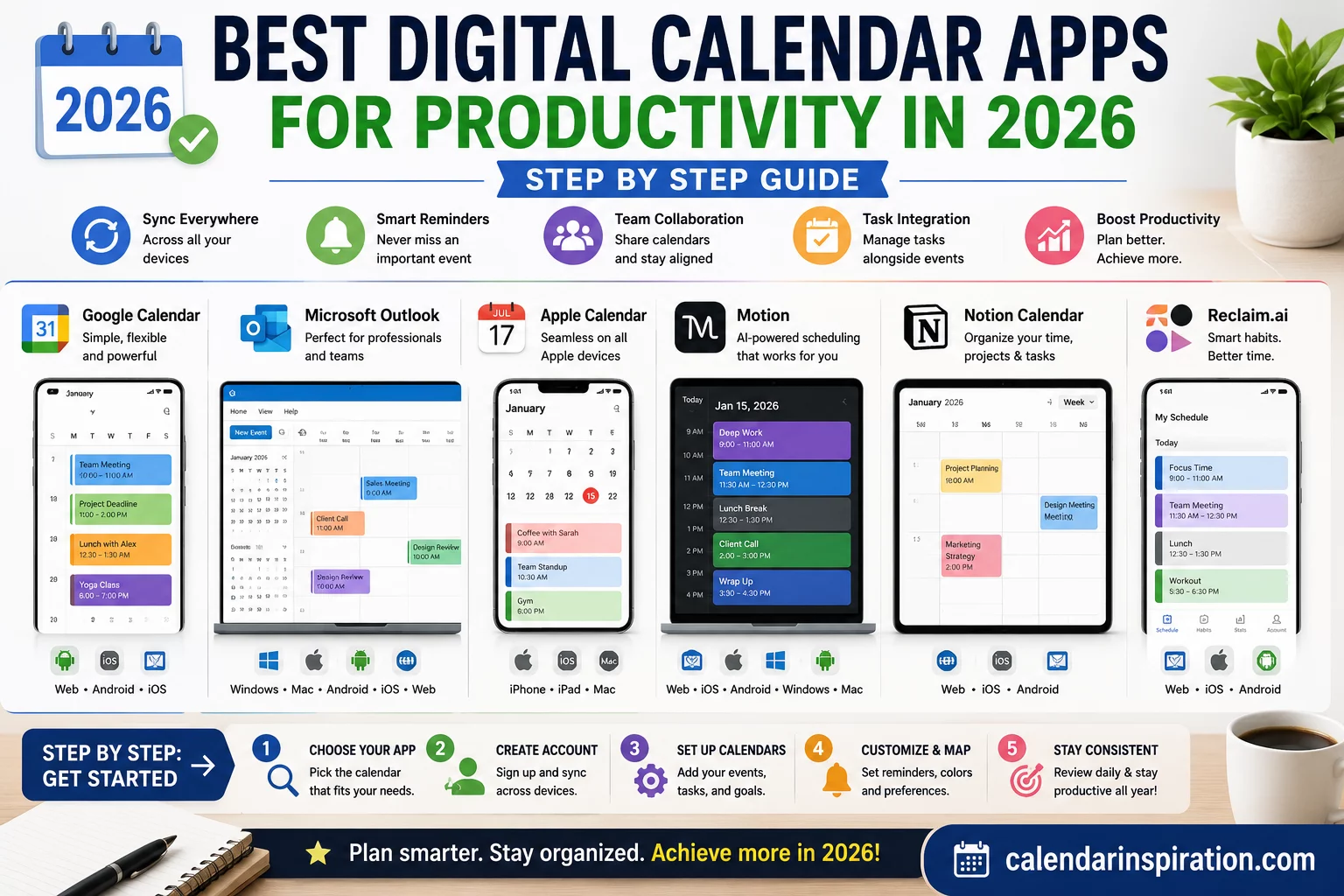
Google Calendar: The Industry Standard
Google Calendar remains one of the most popular digital calendar apps in 2026.
Key Benefits
- Free to use
- Excellent synchronization
- Easy event creation
- Integration with Gmail
- Shared calendars
Best For
- Students
- Professionals
- Small businesses
- Families
Google Calendar continues to be one of the most reliable productivity tools available.
Microsoft Outlook Calendar: Best for Business Users
Outlook Calendar remains a favorite among corporate professionals.
Advantages
- Microsoft 365 integration
- Email scheduling
- Team collaboration
- Enterprise security
- Meeting management
Best For
- Businesses
- Corporate teams
- Remote workers
Outlook excels in professional environments where communication and scheduling are closely connected.
Apple Calendar: Ideal for Apple Ecosystem Users
Apple Calendar provides seamless integration across Apple devices.
Key Features
- iCloud synchronization
- Siri integration
- Shared family calendars
- Clean user interface
- Reliable notifications
Best For
- iPhone users
- iPad users
- Mac users
Those fully invested in Apple’s ecosystem often find Apple Calendar highly effective.
Notion Calendar: Productivity Meets Organization
Notion has become one of the fastest-growing productivity platforms.
Its calendar integrates with:
- Projects
- Databases
- Tasks
- Notes
Advantages
- Flexible workspace
- Visual planning
- Custom workflows
- Productivity tracking
Best For
- Content creators
- Entrepreneurs
- Project managers
Notion is particularly useful for users managing complex workflows.
Motion: AI-Powered Scheduling
Motion uses artificial intelligence to automatically plan schedules.
Features
- Automatic task prioritization
- Dynamic scheduling
- Time blocking
- Productivity optimization
Benefits
Users spend less time planning and more time completing important work.
Motion is gaining popularity among productivity-focused professionals.
Reclaim.ai: Smart Calendar Automation
Reclaim.ai focuses on intelligent time management.
Features
- Habit scheduling
- Focus time protection
- Meeting optimization
- Calendar synchronization
Best For
- Remote workers
- Entrepreneurs
- Busy professionals
The platform automatically protects time for important activities.
Fantastical: Premium Calendar Experience
Fantastical offers a polished and feature-rich calendar experience.
Key Benefits
- Natural language input
- Beautiful interface
- Weather integration
- Multiple calendar support
Best For
- Apple users
- Power users
- Productivity enthusiasts
Many users appreciate its elegant design and powerful functionality.
Any.do Calendar: Tasks and Scheduling Combined
Any.do combines task management with calendar functionality.
Advantages
- Daily planning
- Task reminders
- Goal tracking
- Simple interface
Best For
- Personal productivity
- Goal management
- Daily planning
This hybrid approach helps users stay focused on priorities.
Step-by-Step: Choosing the Right Calendar App
Selecting the best calendar app depends on your needs.
Step 1: Identify Your Goals
Ask yourself:
- Do I need team collaboration?
- Do I manage multiple projects?
- Do I need AI scheduling?
Step 2: Consider Device Compatibility
Choose an app that works on all your devices.
Step 3: Evaluate Integrations
Look for compatibility with:
- Email platforms
- Project management tools
- Communication apps
Step 4: Test Multiple Options
Most calendar apps offer free versions or trials.
Experiment before committing.
Step-by-Step: Setting Up Your Calendar for Productivity
A calendar is only effective when properly configured.
Step 1: Add Important Dates
Include:
- Meetings
- Deadlines
- Appointments
- Personal commitments
Step 2: Use Color Coding
Examples:
- Work = Blue
- Family = Green
- Fitness = Red
- Travel = Orange
Step 3: Enable Notifications
Set reminders based on event importance.
Step 4: Create Recurring Events
Automate regular appointments and tasks.
Step 5: Schedule Review Time
Conduct weekly planning sessions.
These habits significantly improve productivity.
Productivity Tips for Calendar Users
Time Blocking
Reserve specific blocks for focused work.
Protect Deep Work Sessions
Avoid unnecessary meetings during productive hours.
Schedule Breaks
Prevent burnout through planned downtime.
Review Weekly
Evaluate completed tasks and upcoming priorities.
Limit Calendar Clutter
Keep schedules realistic and manageable.
Consistency matters more than complexity.
Common Calendar Mistakes to Avoid
Overbooking
Leave room for flexibility.
Ignoring Notifications
Reminders only work when acted upon.
Mixing Priorities
Separate work and personal commitments clearly.
Failing to Update Calendars
Outdated calendars reduce effectiveness.
Avoiding these mistakes improves long-term success.
Future Trends in Digital Calendars
Calendar technology continues evolving rapidly.
Emerging trends include:
- AI scheduling assistants
- Predictive planning
- Smart meeting optimization
- Voice-controlled scheduling
- Automated workload balancing
The future of calendar management will become increasingly personalized and intelligent.
Frequently Asked Questions
What is the best digital calendar app in 2026?
Google Calendar, Outlook Calendar, Motion, and Notion Calendar are among the top options.
Which calendar app is best for productivity?
Motion and Reclaim.ai offer advanced AI-powered productivity features.
Can I sync multiple calendar apps?
Yes. Most modern calendar platforms support synchronization.
Are digital calendars better than paper planners?
Digital calendars provide automation, reminders, and synchronization that paper planners cannot.
Which calendar app is best for business users?
Microsoft Outlook Calendar remains one of the strongest business solutions.
Do calendar apps improve productivity?
Yes. Effective scheduling, reminders, and time management can significantly improve productivity.
The best digital calendar apps for productivity in 2026 provide far more than simple scheduling. They serve as comprehensive productivity systems that help users manage time, prioritize tasks, coordinate teams, and achieve goals.
Whether you choose Google Calendar, Outlook, Apple Calendar, Motion, Reclaim.ai, or Notion Calendar, success depends on consistent use and effective planning habits. By selecting the right calendar platform and following the step-by-step strategies outlined in this guide, you can stay organized, reduce stress, and maximize productivity throughout 2026 and beyond.